65% Wireless Keyboard with Knob: Hot-Swap, RGB, QMK/VIA
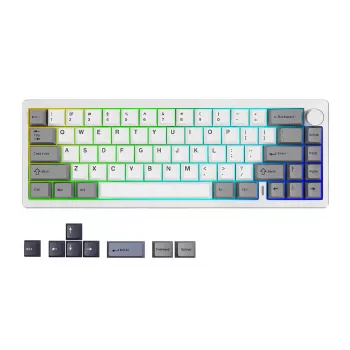
65% Wireless Custom Mechanical Keyboard with Knob, Hot-Swap Sockets, RGB, and QMK/VIA
A 65% mechanical keyboard hits a sweet spot: smaller than a full-size board, but still practical for everyday work. Add wireless modes, a programmable rotary knob, hot-swap switch sockets, per-key RGB, and QMK/VIA support, and you get a compact setup that can be tuned for typing feel, gaming performance, and workflow shortcuts without turning your desk into a cable maze. For more guidance, see [IC] Wireless 60% Custom MK with Hot-swap and QMK.
What makes a 65% layout practical
The 65% layout keeps dedicated arrow keys while trimming away the function row and numpad. That simple change often makes the mouse feel closer and more natural, especially on smaller desks or when you prefer a centered typing posture. For further reading, see Analogg Launches the Ultimate Wireless QMK/VIA ….
- Keeps arrow keys for editing, spreadsheets, and everyday navigation.
- Avoids the steep adjustment that many people feel when moving down to a 60% layout.
- Uses layers for function keys and extra navigation; QMK/VIA makes those layers easy to tailor.
- Frees up space so your shoulders can stay more aligned when switching between keyboard and mouse.
Wireless connection options and what to verify
Wireless can mean different things depending on the board: Bluetooth for easy pairing across devices, and/or 2.4 GHz for lower latency and simpler connectivity in locked-down office environments. Before buying, confirm which wireless modes are supported and how you’ll switch between them.
- Pick Bluetooth for convenient multi-device pairing; pick 2.4 GHz (when available) for fast, dongle-based connectivity.
- For multi-device routines, set up separate profiles (laptop/tablet/desktop) and assign a device-toggle key on a layer.
- Plan charging so you can keep typing while plugged in, without stressing the port or bending the cable sharply.
- If Bluetooth is restricted on a work PC, a 2.4 GHz receiver is often the smoother option.
For standards background, the Bluetooth Core Specification overview is a helpful reference when comparing devices and versions.
The rotary knob: small part, big workflow gain
A programmable knob adds something normal keys can’t: fast analog control. Even simple mappings can save time dozens of times a day, especially if you switch between meetings, music, editing, and browsing.
- Popular defaults: volume up/down, press-to-mute, play/pause, and media scrubbing.
- For productivity: map turning to zoom or horizontal scroll; use a second layer for timeline scrubbing or brush size.
- For gaming: consider weapon cycling or push-to-talk only if the knob won’t be bumped mid-fight.
- Use VIA to test mappings quickly; move to QMK later for advanced behaviors (tap/hold logic, custom macros).
Hot-swap switch support: how it changes customization
Hot-swap sockets make switch tuning approachable: you can change the feel and sound without soldering. That’s great for first-time mechanical keyboard buyers and long-time enthusiasts alike, because preferences often change once you type on a few different switch types.
- Swap linear, tactile, or clicky switches in minutes to adjust speed, feedback, and sound.
- Mix-and-match by zone: heavier switches on modifiers, lighter on alphas, tactile on navigation keys.
- Check compatibility (commonly MX-style 3-pin/5-pin) and never force mismatched pins into sockets.
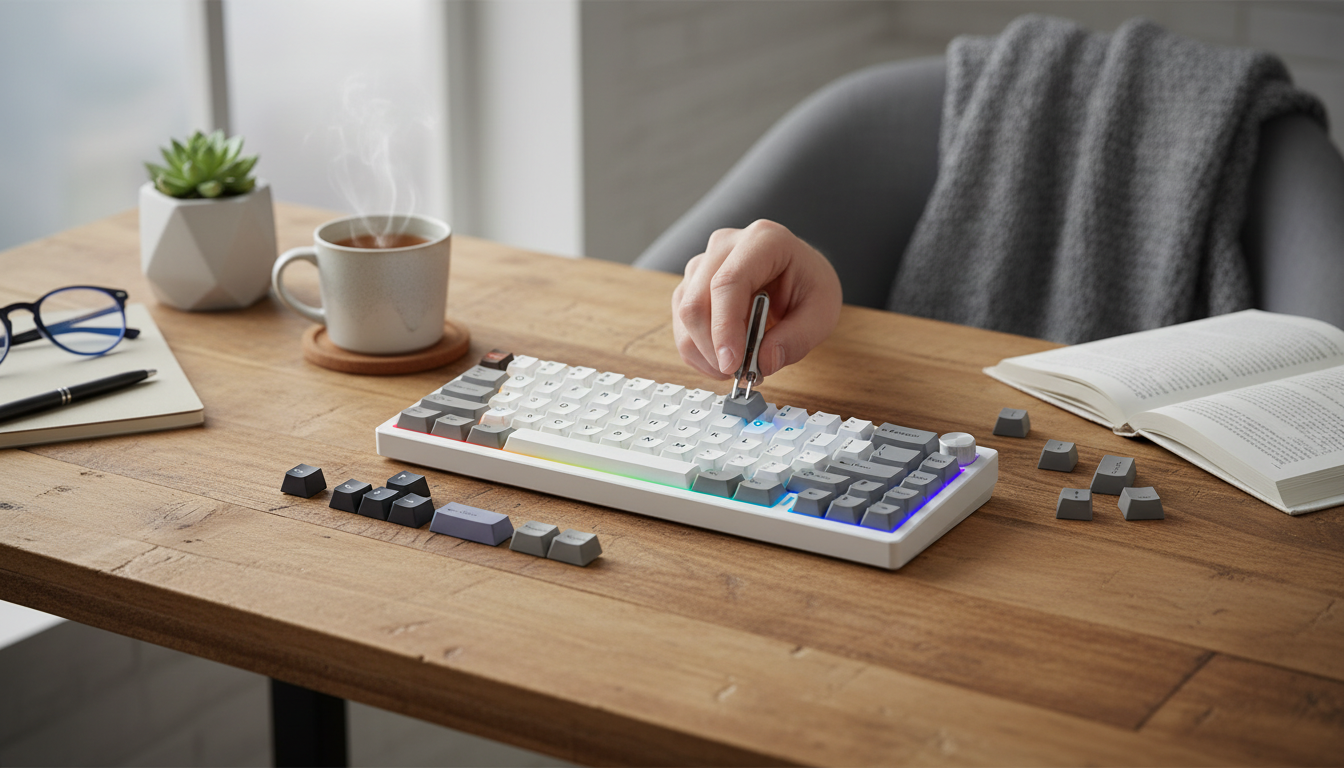
- For maintenance, pull keycaps straight up, use a switch puller, and inspect for bent pins before reinserting.
RGB lighting: useful beyond aesthetics
Per-key RGB can be more than decoration. When you rely on layers, lighting can act like a visual “mode indicator,” helping prevent mis-presses when you’re moving quickly.
QMK and VIA: two paths to the same goal
Feature overview for daily use
| Feature | What it enables | Who benefits most | Quick setup tip |
|---|---|---|---|
| 65% layout | Compact footprint with arrow keys | Gamers + writers + small desks | Map F-keys to a function layer |
| Wireless modes | Cable-free desk and multi-device switching | Hybrid work and laptop/tablet users | Assign a device-toggle key on a layer |
| Rotary knob | Fast analog control for volume/zoom/scroll | Editors, streamers, multitaskers | Press = mute, turn = volume |
| Hot-swap sockets | No-solder switch experimentation | Enthusiasts and first-time modders | Test 1 switch type per row before committing |
| RGB | Visibility and layer feedback | Night users and layer-heavy setups | Use layer-based colors |
| QMK/VIA | Remapping, macros, layers | Power users | Save a backup layout file |
Buying and compatibility checklist
Setup guide: from unboxing to a personalized layout
Common issues and quick fixes
In-stock picks
- 65% Wireless Custom Mechanical Keyboard with Knob, Hot Swap, RGB & QMK/VIA Support
- Passport to Savings: How to Fund Your Dream Trip Without Going Broke – Budget Travel Guide | How to Save for a Trip eBook | Travel Savings Checklist
- Classic Houndstooth Plaid Wide Sponge Headband – Non-Slip Hairband for Women & Girls
FAQ
Does hot-swap mean any switch will fit?
No. Most hot-swap boards are designed for MX-style switches, and you still need to match 3-pin vs. 5-pin compatibility. Forcing a switch with bent or incompatible pins can damage the socket, so it’s best to verify fit and insert straight down.
What is the difference between VIA and QMK for remapping?
VIA is built for quick remaps and macros without compiling firmware, making it ideal for most day-to-day customization. QMK goes deeper with firmware-level features like combos, tap dance, and custom behaviors for complex layouts.
How should the knob be mapped for everyday use?
A reliable default is turn for volume and press for mute (or play/pause). If you use multiple apps, add a second layer for zoom/scroll or a few app-specific shortcuts so the knob stays useful beyond media control.








Leave a comment